

Açıklama
Kodladığım, powershell betiği, verdiğiniz hex renk kodunu (ör. #FF5733) RGB ve HSL formatlarına çevirir. Ardından HSL değerleri üzerinden renk uyumu türlerine göre (Complementary, Analogous, Triadic, Split Complementary, Tetradic, Monochromatic) yeni renkler üretir ve konsolda hem hex renkleri hem de her rengi BBCode formatında ekrana yazar.
Betiğin amacı, seçtiğiniz bir rengin üzerine renk uyumu (color harmony) mantığıyla doğada görülen tarzlara benzer farklı uyumlu renk kombinasyonları üretmektir.
Kullanılanabilir olduğu yerler:
BETİK İÇERİĞİ :
EKRAN GÖRÜNTÜSÜ :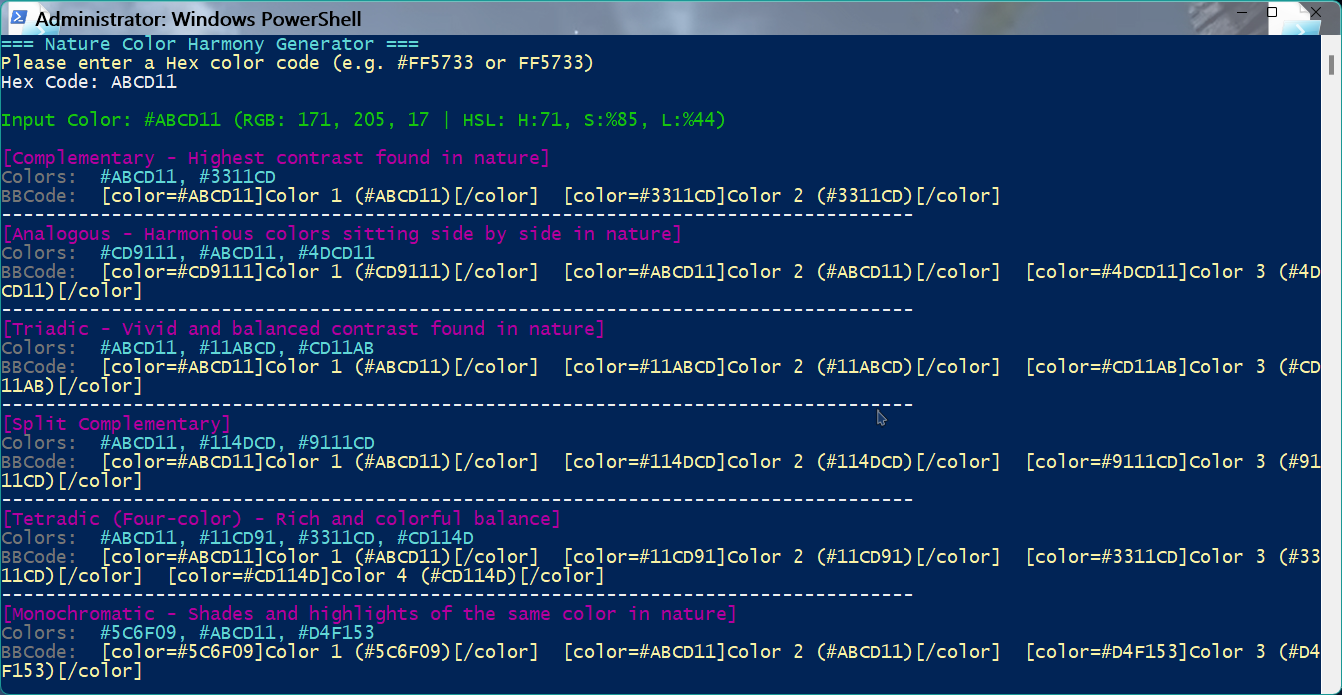
Güle güle kullanın...
Kodladığım, powershell betiği, verdiğiniz hex renk kodunu (ör. #FF5733) RGB ve HSL formatlarına çevirir. Ardından HSL değerleri üzerinden renk uyumu türlerine göre (Complementary, Analogous, Triadic, Split Complementary, Tetradic, Monochromatic) yeni renkler üretir ve konsolda hem hex renkleri hem de her rengi BBCode formatında ekrana yazar.
Betiğin amacı, seçtiğiniz bir rengin üzerine renk uyumu (color harmony) mantığıyla doğada görülen tarzlara benzer farklı uyumlu renk kombinasyonları üretmektir.
Kullanılanabilir olduğu yerler:
- Tasarım: Web sitesi, logo, poster gibi görseller için uyumlu palet bulmak.
- Tema/palet oluşturma: Ana rengine uygun tamamlayıcı, benzer, üçlü vb. renk setleri çıkarmak.
- BBCode ile paylaşım: BBCode kullanan forum/ortamlarda renkleri hızlı ekrana basmak ve paylaşmak.
BETİK İÇERİĞİ :
Kod:
# HSL and RGB conversion functions

function Get-HueToRgb ($p, $q, $t) {
    if ($t -lt 0) { $t += 1 }
    if ($t -gt 1) { $t -= 1 }
    if ($t -lt 1/6) { return $p + ($q - $p) * 6 * $t }
    if ($t -lt 1/2) { return $q }
    if ($t -lt 2/3) { return $p + ($q - $p) * (2/3 - $t) * 6 }
    return $p
}

function Convert-HslToRgb ($h, $s, $l) {
    $r = 0; $g = 0; $b = 0
    if ($s -eq 0) {
        $r = $g = $b = $l
    } else {
        $q = if ($l -lt 0.5) { $l * (1 + $s) } else { $l + $s - ($l * $s) }
        $p = 2 * $l - $q
        $r = Get-HueToRgb $p $q ($h + 1/3)
        $g = Get-HueToRgb $p $q $h
        $b = Get-HueToRgb $p $q ($h - 1/3)
    }
    return @{ R = [int][math]::Round($r * 255); G = [int][math]::Round($g * 255); B = [int][math]::Round($b * 255) }
}

function Convert-RgbToHsl ($r, $g, $b) {
    $r /= 255.0; $g /= 255.0; $b /= 255.0
    $max = [math]::Max($r, [math]::Max($g, $b))
    $min = [math]::Min($r, [math]::Min($g, $b))
    $l = ($max + $min) / 2.0
    $h = 0; $s = 0

    if ($max -ne $min) {
        $d = $max - $min
        $s = if ($l -gt 0.5) { $d / (2.0 - $max - $min) } else { $d / ($max + $min) }
        # Using if/elseif instead of switch to avoid multi-match issues when two channels tie for max
        if ($max -eq $r) {
            $h = ($g - $b) / $d + (if ($g -lt $b) { 6 } else { 0 })
        } elseif ($max -eq $g) {
            $h = ($b - $r) / $d + 2
        } else {
            $h = ($r - $g) / $d + 4
        }
        $h /= 6.0
    }
    return @{ H = $h * 360; S = $s; L = $l }
}

Write-Host "=== Nature Color Harmony Generator ===" -ForegroundColor Cyan
Write-Host "Please enter a Hex color code (e.g. #FF5733 or FF5733)" -ForegroundColor Yellow
$inputHex = Read-Host "Hex Code"

# Clean and validate user input
$inputHex = $inputHex.Trim().TrimStart("#")
if ($inputHex -notmatch '^[0-9A-Fa-f]{6}$') {
    Write-Host "Invalid Hex code entered! Please enter a valid 6-character Hex code." -ForegroundColor Red
    Read-Host "`nPress ENTER to exit."
    exit
}

# Convert Hex to RGB
$R = [Convert]::ToInt32($inputHex.Substring(0,2), 16)
$G = [Convert]::ToInt32($inputHex.Substring(2,2), 16)
$B = [Convert]::ToInt32($inputHex.Substring(4,2), 16)

# Convert RGB to HSL
$Hsl = Convert-RgbToHsl $R $G $B
$H = $Hsl.H
$S = $Hsl.S
$L = $Hsl.L

Write-Host "`nInput Color: #$inputHex (RGB: $R, $G, $B | HSL: H:$([math]::Round($H)), S:%$([math]::Round($S*100)), L:%$([math]::Round($L*100)))`n" -ForegroundColor Green

# Harmony calculation function (generates a new Hex from HSL deltas)
function Get-Harmony ($hDelta, $sDelta, $lDelta) {
    $newH = ($H + $hDelta) % 360
    if ($newH -lt 0) { $newH += 360 }

    # Manual clamping (Min:0, Max:1) for compatibility with older PowerShell versions lacking [math]::Clamp
    $newS = $S + $sDelta
    if ($newS -lt 0) { $newS = 0 }
    if ($newS -gt 1) { $newS = 1 }

    $newL = $L + $lDelta
    if ($newL -lt 0) { $newL = 0 }
    if ($newL -gt 1) { $newL = 1 }

    $rgb = Convert-HslToRgb ($newH / 360.0) $newS $newL
    return ("#{0:X2}{1:X2}{2:X2}" -f $rgb.R, $rgb.G, $rgb.B)
}

# Nature-inspired color harmony types and their BBCode output
$harmonies = @(
    @{
        Name = "Complementary - Highest contrast found in nature";
        Colors = @("#$inputHex", (Get-Harmony 180 0 0))
    },
    @{
        Name = "Analogous - Harmonious colors sitting side by side in nature";
        Colors = @((Get-Harmony -30 0 0), "#$inputHex", (Get-Harmony 30 0 0))
    },
    @{
        Name = "Triadic - Vivid and balanced contrast found in nature";
        Colors = @("#$inputHex", (Get-Harmony 120 0 0), (Get-Harmony 240 0 0))
    },
    @{
        Name = "Split Complementary";
        Colors = @("#$inputHex", (Get-Harmony 150 0 0), (Get-Harmony 210 0 0))
    },
    @{
        Name = "Tetradic (Four-color) - Rich and colorful balance";
        Colors = @("#$inputHex", (Get-Harmony 90 0 0), (Get-Harmony 180 0 0), (Get-Harmony 270 0 0))
    },
    @{
        Name = "Monochromatic - Shades and highlights of the same color in nature";
        Colors = @((Get-Harmony 0 0 -0.2), "#$inputHex", (Get-Harmony 0 0 0.2))
    }
)

foreach ($harmony in $harmonies) {
    Write-Host "[$($harmony.Name)]" -ForegroundColor Magenta

    # BBCode generation
    $bbcodeString = ""
    $colorIndex = 1
    foreach ($hex in $harmony.Colors) {
        $bbcodeString += "[color=$hex]Color $colorIndex ($hex)[/color]  "
        $colorIndex++
    }

    Write-Host "Colors:  " -NoNewline -ForegroundColor DarkGray
    Write-Host ($harmony.Colors -join ", ") -ForegroundColor Cyan
    Write-Host "BBCode:  " -NoNewline -ForegroundColor DarkGray
    Write-Host $bbcodeString -ForegroundColor Yellow
    Write-Host "-----------------------------------------------------------------------------------"
}

Write-Host "`nDone." -ForegroundColor Green
Read-Host "`nPress ENTER to exit."
EKRAN GÖRÜNTÜSÜ :
Güle güle kullanın...